 OFFSCRIPT
Blog · 2026-11-19
Football Match Centre: What It Is and How Clubs Build One

Football Match Centre: What It Is and How Clubs Build One
A football match centre is one page per game on your club website. It holds everything about that match in one place: the preview before kickoff, the line-ups and events during play, and the report and stats afterward. For an amateur club, the version that works is the one that fills itself in from your fixture and result data, so a volunteer is not retyping the same details every weekend. That is how we build the match centre at OFFSCRIPT, as an add-on to a managed club website.
TL;DR
- A match centre is a dedicated page for each game that works in three stages: before, during and after the match.
- Big clubs run theirs on live data feeds. A grassroots club needs the same structure with far less: fixture, line-up, score, report and a few photos.
- Outdated pages are the real risk. Design the match centre so that entering a result updates the fixtures list, the table and the team page together.
- At OFFSCRIPT the match centre is an add-on: €390 one-off plus €19 per month, excl. VAT, on top of a Start, Club or Pro website plan.
- Run the free website check first to see what your current site already does.
Table of Contents
- What a football match centre actually is
- The three stages every match page needs
- What each level of club really needs
- The real problem: keeping it up to date
- Build the match centre around a content system, not a one-off page
- Match centre and sponsors
- A practical weekly routine
- How OFFSCRIPT handles the match centre
- Choosing the right setup
- FAQ
- Sources
What a football match centre actually is
The term comes from professional football. When Tottenham Hotspur relaunched theirs, they described a dedicated page for every game, reachable ahead of each matchday, that gathers previews and news before the game, live commentary and stats during it, and reports and interviews afterward. The idea was to give fans who cannot be at the ground one place to follow the match.
A grassroots or semi-pro club has the same audience on a smaller scale: parents who could not make the Saturday morning game, a sponsor who wants to see their name on matchday, a player checking the kickoff time and the pitch. They all ask the same questions. Who are we playing, where, when, who is in the squad, what was the score, who scored?
So a match centre is not a piece of software you have to understand. It is a page template, one per match, plus the data behind it.
The three stages every match page needs
The clearest way to design a match centre is by time. Each match page has three states, and the content changes as the game moves through them.
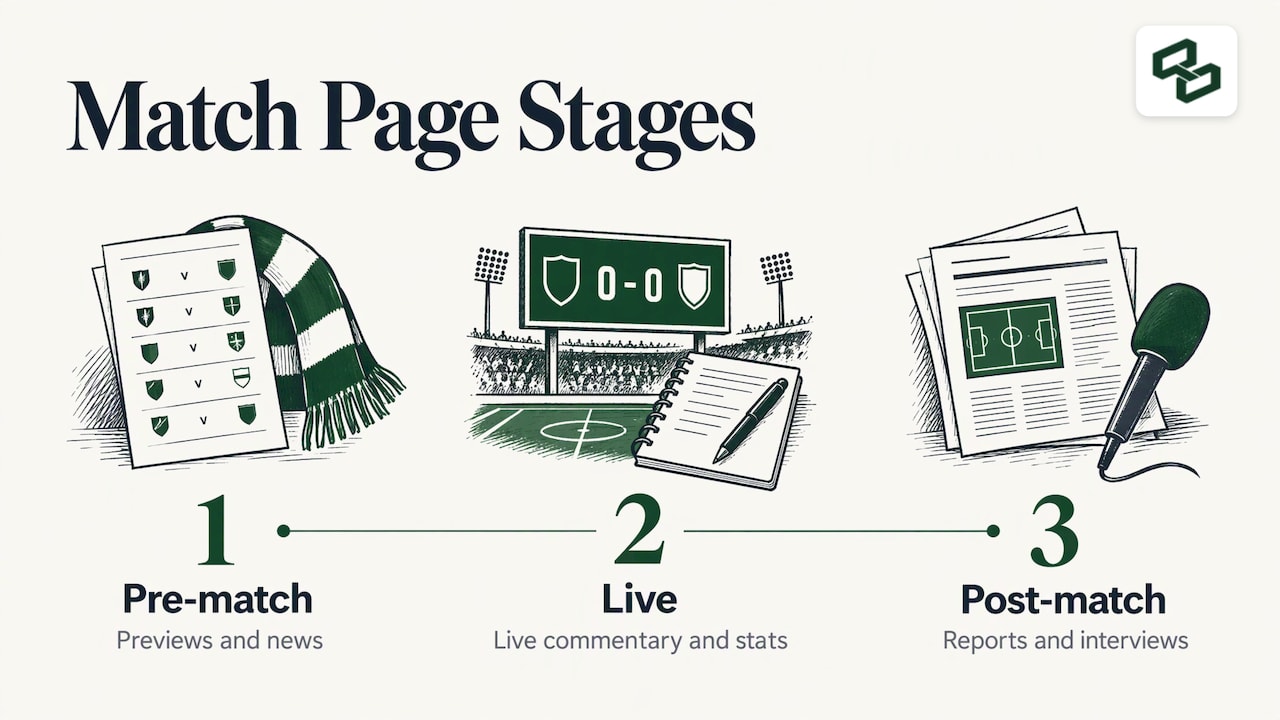
Before the match
This is the stage that gets the most traffic from your own members, because people look up details in the days before the game. Put these on the page:
- Date, kickoff time, home or away, team and competition.
- Venue with an address and a map link, plus parking or entrance notes for visiting families.
- Squad or expected line-up, once the coach confirms it.
- A short preview: form, the last meeting between the two sides, anyone returning from injury.
- Ticket or entry information if you charge, and a sponsor line for the matchday.
The Manchester United app, for example, lists build-up team news, injury updates and line-ups in the pre-game stage. You do not need that depth. Time, place, squad and one paragraph of preview already beat most club sites.
During the match
Live coverage is optional for amateur clubs, and it is fine to skip it. Many clubs do a lightweight version: the score, the goalscorers and the final time entered by one person on the touchline. Professional operations go much further. The NASL’s data partner describes a Match Center that populates live data on league and club websites as the action unfolds, drawn from a professional stats feed. That kind of feed costs money and makes little sense for a Sunday league side.
If you do want a live element, keep it to what one person can reliably do from a phone: goals, cards, substitutions, half-time and full-time scores.
After the match
This is where the page earns its keep as a record, and where most clubs fall behind. After the final whistle the page should carry:
- The final score and the scorers and assists.
- A match report with two or three photos.
- Cards, appearances and the man or woman of the match.
- The updated league position, and a link to the next fixture.
Professional sites go on to publish heat maps, passing charts and goal replays after the match. For your club the equivalent is a clean report and an accurate record of who played.
What each level of club really needs
The scope of the match centre should follow your level, not the Premier League’s.
| Club level | What the match page should hold | Where the data comes from |
|---|---|---|
| Grassroots, volunteer-run | Fixture details, squad, score, scorers, short report, photos | Entered once per match by one person |
| Semi-professional | All of the above plus appearances, cards, sponsor placement, social posts per match | Entered by a media officer, with results flowing into tables |
| Professional | Live stats, line-ups, multiple teams (first team, women’s, academy), ticketing and shop links | League or data-provider feed plus the club’s own content |
The multi-team point matters even at small scale. A club with a first team, a reserve side and several youth sides needs one match structure that works for all of them, with each team’s fixtures filterable on its own page. Professional clubs do this too: one club app, for instance, covers the men’s, women’s, U21 and U18 teams in a single Matches page.
The real problem: keeping it up to date
A match centre fails in one way. It starts the season with every fixture listed and a report for the opener, then goes quiet by October because the volunteer who updated it got busy. A stale match centre is worse than none, because it tells visitors, and sponsors, that the club is not paying attention.
The fix is to cut the number of places a result has to be typed. Professional leagues have learned this. The Swiss Football League built a shared Matchcenter project so that clubs can pull official match data and statistics straight into their own sites. One club said it no longer has to enter the data itself, and another said automated updates of matches, results and tables were decisive. The same article quotes a club’s communications chief saying that reusing an existing solution was more economical than building one from scratch with an agency.
You are not a league with a data deal, but the principle carries over:
- Enter each fact once. A result typed into the match record should update the match page, the fixtures list, the team page and the home page.
- Make the entry form short. Score, scorers, line-up and a report. If it takes more than five minutes, it will not get done after a cold Saturday.
- Let tools draft the first version. A match report generated from the facts you entered turns a blank page into an edit job.
- Share the load. Give each team’s manager access to their own team’s matches and nothing else.
Build the match centre around a content system, not a one-off page
When a club builds a match page by hand, in a page builder or a document pasted into a site, every match is a new piece of work. When it is built on a content system with a match template, every match is a form. That difference decides whether the page survives the season.
A sports-site guide from a data provider lists the same core pieces for any serious football site: match pages with timeline, stats, line-ups and commentary, league pages with standings, fixtures and results, and an admin dashboard for managing content. Strip out the pieces only a big operator needs, and you are left with the same list we gave above.
If you are comparing website options more broadly, our guide to what football clubs need from a team website builder covers the wider checklist: ownership of your domain and data, who handles updates, and what happens when your volunteer admin steps down.
Match centre and sponsors
The match page is the most natural place to show sponsors, because it is the page people open on matchday. Three placements work without clutter:
- A “Match presented by” line at the top of the page.
- The sponsor logo in the match report footer.
- A monthly report to the sponsor showing how many people opened match pages.
The FA’s club guidance suggests using the website and social media match by match to publish a matchday timetable of activities and promotions, which gives supporters reasons to attend. That timetable is a natural block on the pre-match stage, and it is a good slot for a local business to sponsor. The same guidance recommends a “you said, we did” section to show members that feedback is acted on, which also fits well on a club site next to the match page.
OFFSCRIPT websites include sponsor areas and sponsor reporting. We also offer a website sponsor “Presented by …” package with a ready-made sponsor offer for €149 one-off, excl. VAT.
A practical weekly routine
A routine of 20 minutes per match is realistic for a volunteer:
- Tuesday or Wednesday: confirm venue and kickoff, publish the squad when the coach sends it.
- Friday: post the preview and share the match page link in the team group chat.
- Matchday: one person enters goals and the final score from their phone.
- Sunday: generate or write the report, add three photos, publish, and post to social media.
- Monthly: send sponsors a short summary.
If the website is set up so that steps 3 to 5 are forms and buttons, the routine holds up through a long season. If each step means editing a page by hand, it does not.
How OFFSCRIPT handles the match centre

OFFSCRIPT builds and runs football club websites with our own CMS, OFFSCRIPT Studio. Your club manages news, squads and fixtures in it, and match reports can be generated with AI. Hosting, backups, real-time security updates and maintenance are part of the service, so the site does not depend on one volunteer’s free evenings. You keep access to all your content, data and configuration, and the domain and data stay yours.
The match centre is an optional module:
| Item | Price (excl. VAT) |
|---|---|
| Match centre, one-off | €390 |
| Match centre, monthly | €19 per month |
| Extra team | €40 one-off per team |
| Social media kit (Instagram and Facebook templates in club design) | €290 one-off |
| Content care by OFFSCRIPT S | €99 per month |
| Content care by OFFSCRIPT M | €199 per month |
The website plans it sits on are Start at €49 per month, Club at €129 per month and Pro at €349 per month, with one-time setup of €490, €990 and from €2,900 respectively. Enterprise is €2,490 per month for professional clubs that need a comprehensive platform. All prices are excl. VAT and are listed on our packages page.
If your club already has a site and a stack of old reports, we can move your old website so the history is not lost.
Not sure where your current site stands? Our free website check is the quickest first step, and the packages page shows what each plan includes.
Choosing the right setup
Use these questions to decide how much match centre you need:
- How many teams play each weekend? More than two or three means you need a shared match structure with team-level access.
- Who updates the site today? If it is one person, plan for the day they are unavailable.
- Do sponsors expect visibility? If yes, put them in the match page template from day one.
- Do you sell tickets or kits? Ticketing and shop modules can link from the match page. We offer a ticketing integration and an online shop integration, each at €390 one-off plus €29 per month, excl. VAT.
- Do you play in more than one language? Extra languages are €290 one-off or €19 per month per language, excl. VAT.
A grassroots club can start with the match centre basics and add teams as the season grows. A semi-professional or professional club can build in the sponsor, ticketing and multi-team modules from the start.
FAQ
What is the difference between a match centre and a fixtures page?
A fixtures page is a list of games. A match centre gives every game its own page, with the preview, line-up, score, report and photos. The fixtures page links into the match pages, and the two should update from the same data.
Does a grassroots club need live stats?
No. Professional clubs use data feeds for live statistics, but for amateur football the useful minimum is the score, the scorers and a short report. Keep the live element to what one person can enter from the touchline.
How much does a match centre cost with OFFSCRIPT?
The match centre add-on is €390 one-off plus €19 per month, excl. VAT. It sits on top of a website plan: Start is €49 per month, Club €129 per month and Pro €349 per month, also excl. VAT.
How do we stop the match centre going out of date?
Enter each result once and let it update every other page. Give each team manager access to only their own team, and use AI-generated drafts for match reports so the weekly task is an edit, not a blank page.
Can we start with a free website check?
Yes. OFFSCRIPT offers a free website check at check.offscriptfootball.com, and the packages page shows the plans and add-ons for the next step.
Sources
- New and improved Match Centre, now live (Tottenham Hotspur)
- About Opta (NASL)
- Man Utd official app
- Burnley FC App case study
- Plus de données, moins d’efforts: le projet Matchcenter de la SFL
- The FA: Growing Your Club
- How to Make A Sports Site? (iSports API)